Changelog
(Updated )- - Shipped a brand-new look. The new brand is brighter, warmer, and more playful.
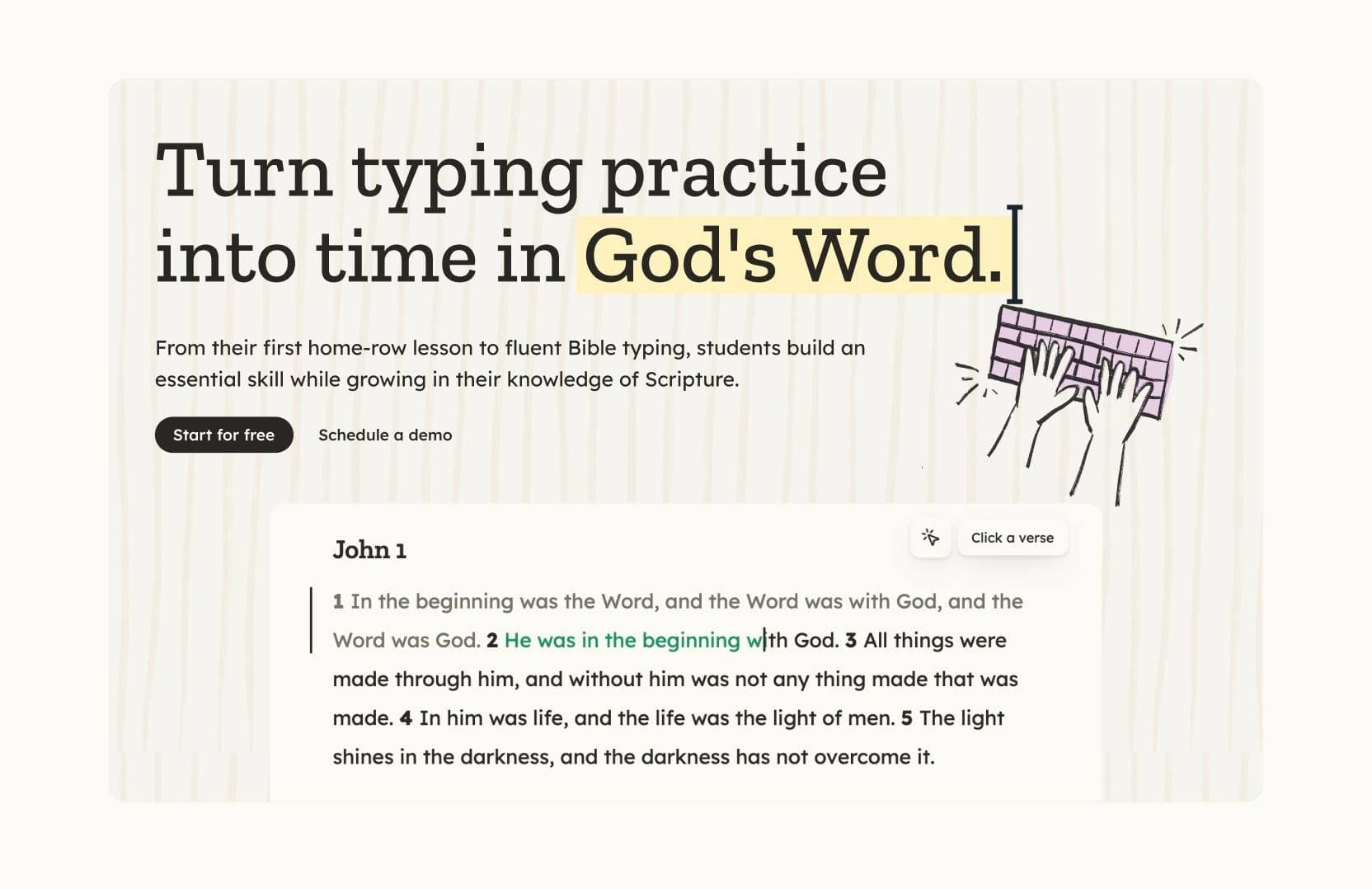
- Switched body type to Lexend so text is easier to read, and paired it with Zilla Slab headings.
- Added a new illustration style.

- Removed custom themes.
- Added Typing feedback in Settings so color-blind users can adjust success and error colors.

- - Added the personal referral program. Invite friends to earn exclusive rewards.
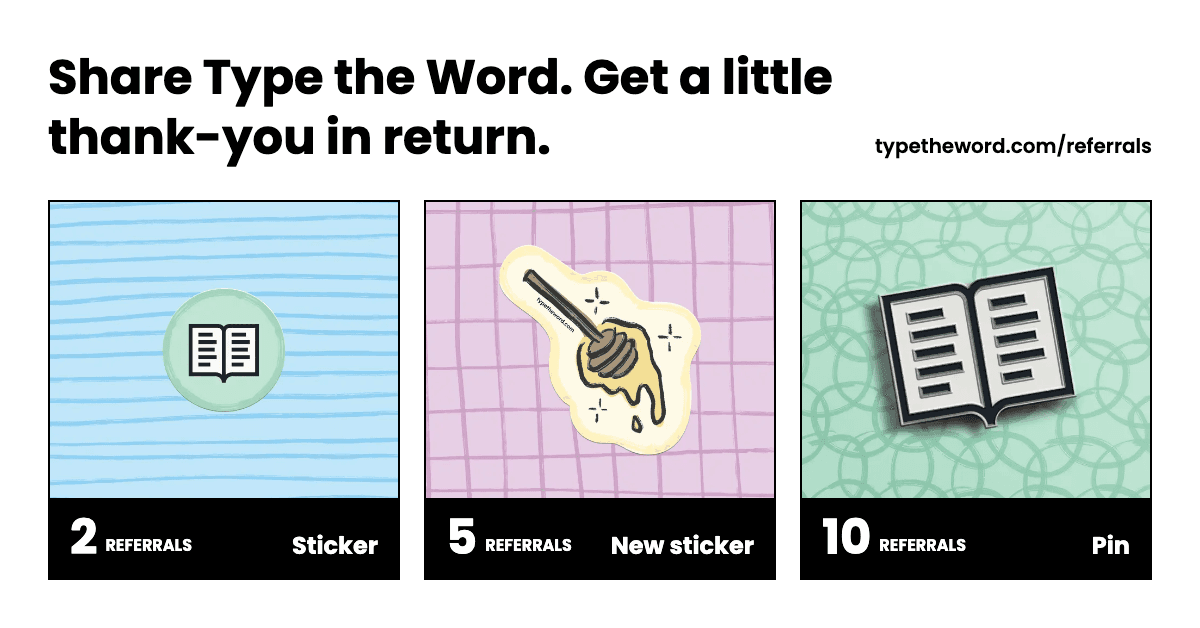
- - Opened the Type the Word merch store.

- - Added the ability to select a next action after completing an action. This makes it easy to continue with the same goal or switch to another.
- - Added highlighting to Passage of the Day.
- - Added the New American Standard Bible 1995 (NASB1995) translation.
- - Added the Good News Translation (GNTD). This is Type the Word's first deuterocanonical translation.
- - Added Type the Word's first German translation: the German Unrevised Elberfelder Bible (ELB).
- - Shipped Passage of the Day, a weekday scripture typing challenge available at /daily.
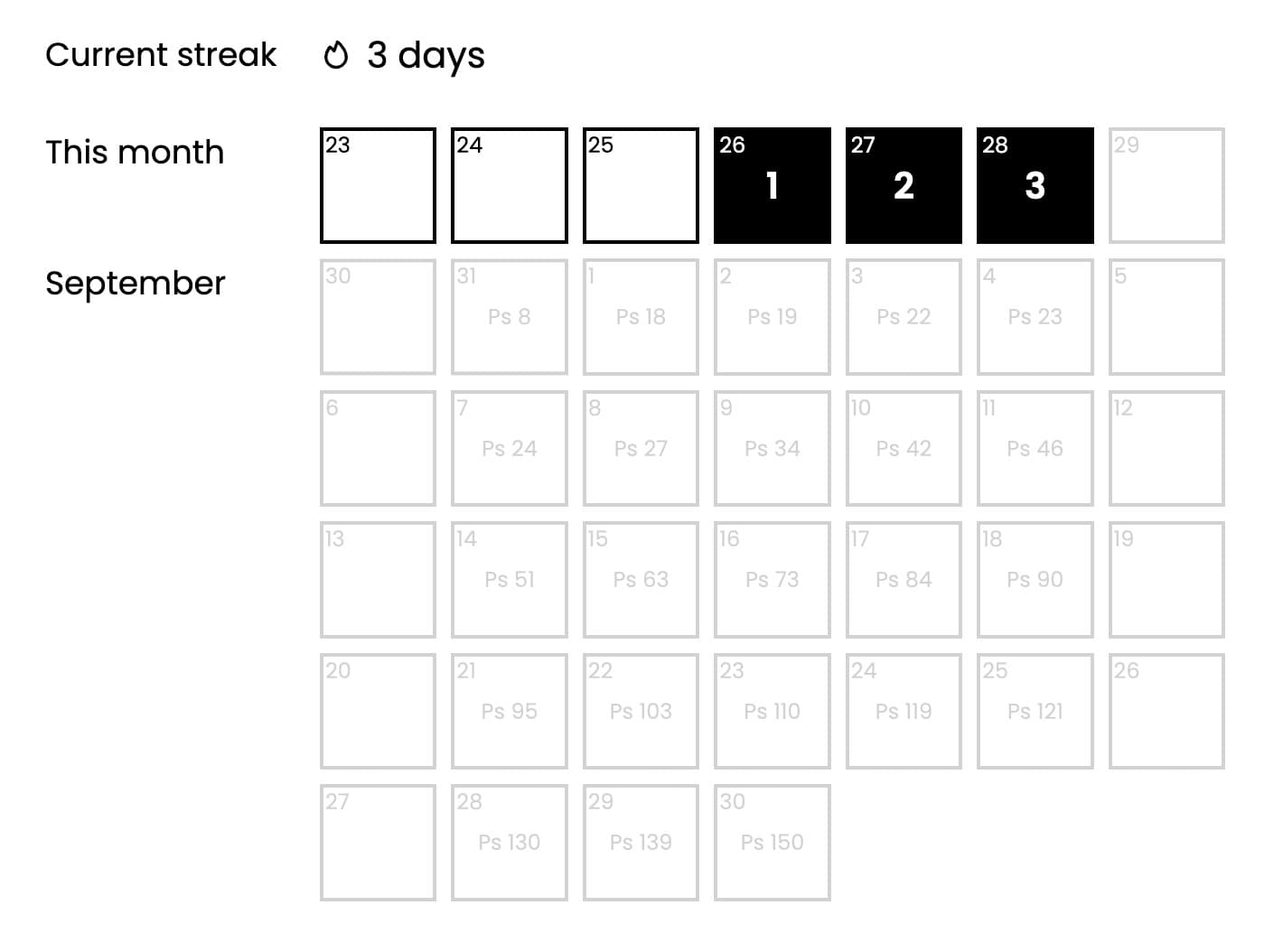
- Added live participant and verse totals so you can see how many people are typing each daily passage together.
- Added completion streaks that skip weekends and other unscheduled days.
- Added a calendar for browsing past and upcoming passages and revisiting earlier daily challenges.
- Added an optional Daily Passage reminder email to personal settings.
- - Fixed CSB John 5 so typing now continues from verse 3 to verse 5 instead of stopping at omitted verse 4.
- - Defaulted student accounts to NIRV. Last used translation still wins.
- Made student catalog Scripture Scribes use your last translation, defaulting to NIRV.
- Showed average accuracy on student lesson cards.
- Made key introductions tell you to find the key and press it.
- Mixed prefix and suffix punctuation through Faith Words.
- Limited X and Period Faith Words to words that contain X.
- - Added New International Reader’s Version (NIRV) support.
- - Fixed a bug that prevented accented letters from being typed on Mac.
- - Added translation-specific verse and typing session totals to History.

- Added wider passage progress indicators for verses typed multiple times in the current session.
- Reset gray passage progress after each action repetition so it only shows what you've typed in the current repetition.
- Added optional auto-advance for completed personal actions.
- Added a "Go to next action" button and Enter shortcut after completing a personal action.
- - Added Microsoft account sign-in and signup.
- Moved Type the Word to typetheword.com and redirected typetheword.site to the new domain.
- Added a domain-change notice reminding users to update their password manager.
- - Fixed ESV passage ranges so mid-chapter links like 1 Corinthians 12:12-27 load normally.
- - Added support for the King James Version.
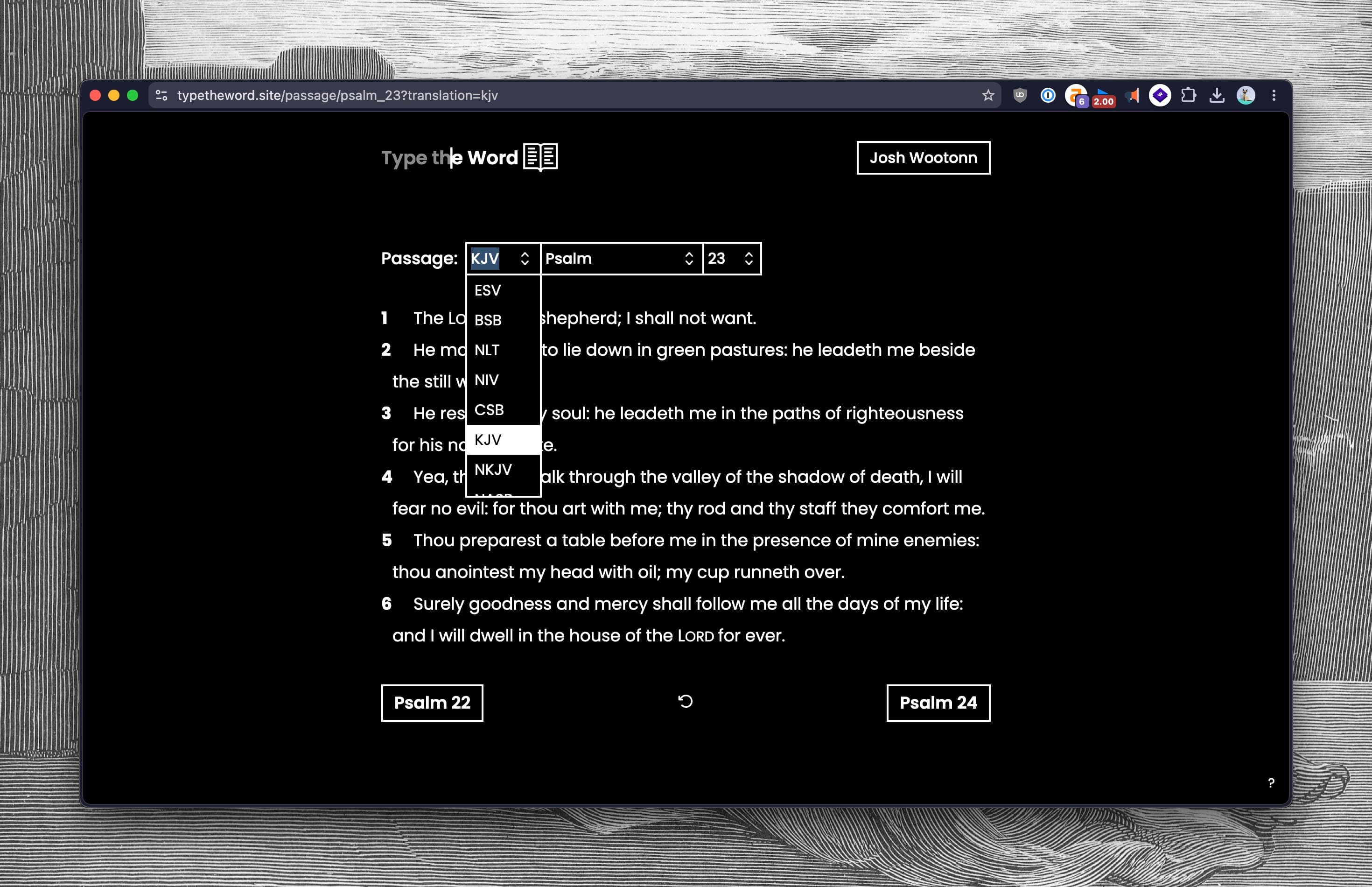
- Added the ability to manually restart chapter progress.
- Improved number fields so quantity controls better match nearby form inputs.
- Fixed missing-letter mode so extra letters use the same underline placement as incorrect letters.
- Simplified personal action tables so passages, goals, progress, and repetitions are easier to scan.
- Removed personal action title fields from action forms.
- Removed personal goal and action status controls from personal pages.
- Added the ability to edit personal actions.
- Added the ability to edit classroom assignments before publishing them.
- Multi-chapter actions now reopen on the chapter that matches your current progress.
- Reopened actions now start at the next untyped verse in that chapter instead of jumping back to the first verse.
- Completing a chapter in an action now automatically moves you to the next chapter in that action.
- The "Reveal Word" button now works before the last paragraph for verses split across multiple paragraphs.
- Fixed NIV passages with nested opening quotes so verses like Mark 13:24 can be typed normally.
- Added modes to the action and assignment creation forms for quickly creating full-book typing plans and memorization plans for personal actions and classroom assignments.
- Improved passage labels so full-chapter ranges are easier to scan across actions and assignments.
For example, Genesis 1:1-2:34 is now displayed as Genesis 1-2.
- - Fixed Google Classroom assignment creation so new assignments use the connected goal's topic instead of incorrectly creating a separate topic.
- Updated passage pages so the typing view has more breathing room before the citation and footer.
- Updated footers so public pages show more helpful links while app pages keep a compact footer.
- - Fixed multi-chapter assignments so opening one starts at the first assigned verse instead of the beginning of the chapter.
- Made bookmarks unique by book of the Bible and translation.
- Added goal columns to personal action tables and made home page actions sortable.
- Added the ability to move personal actions between goals from the actions menu.
- - Finishing a chapter now moves you to the next chapter automatically.
- Fixed the last typed location link so it opens your next verse instead of the verse you already typed.
- Updated memorization passages so completed verses stay visible after you move to the next verse.
- Added direct location links for your last typed passage and next action.
Route name Route Last Typed Location /location/last-typedNext Action Location /location/next-action - Added "First Letter Only" memorization mode. This mode is helpful for quickly getting repetitions on verses you are familiar with but don't have memorized yet. Combining it with saying each word out loud is effective for taking verses from familiar to memorized.
- Added direct location links for your last typed passage and next action.
- Added assignment modes to student classroom lists so students can see how each assignment should be completed before opening it.
- Added a shortcut menu where you can customize global keyboard shortcuts for the device you are using.
- Fixed verse resets in memorization modes so revealed words were hidden again when you restarted a verse.
- Added passage selectors to the landing page and signed-in home page so you can choose where to start typing without going to a random scripture.
- - Fixed verse selection so typing continued from the last verse you completed, even when a later verse had already been typed.
- - Updated multi-chapter classroom assignments to open on the chapter tied to your current progress when no chapter was selected.
- - Added a translations directory so you can browse every supported translation, drill down to a book, and pick a chapter from one place. Bare book URLs like
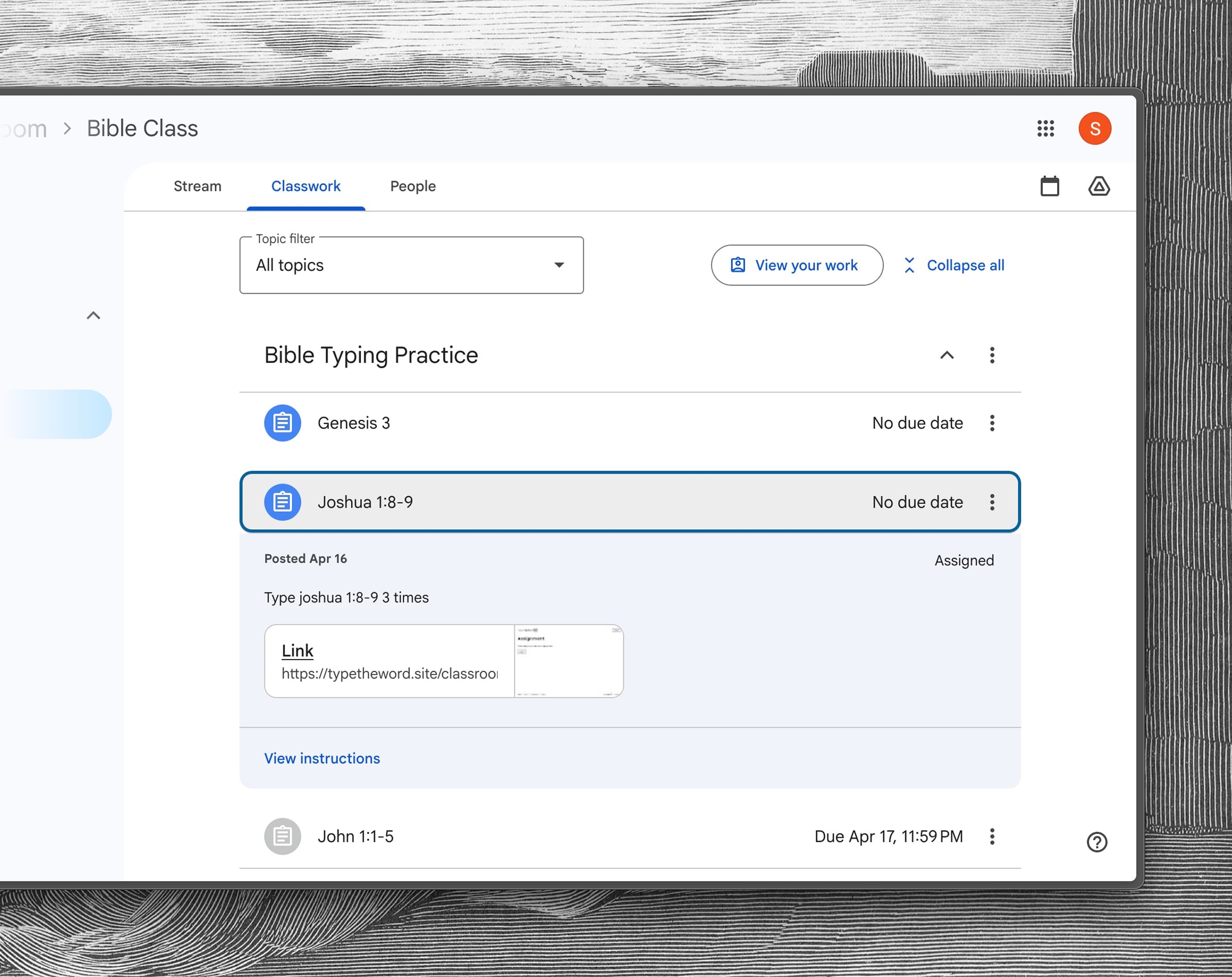
/passage/johnnow show the passage selector instead of redirecting to chapter 1. - - Added a dedicated Google Classroom page that explains assignment syncing, memorization modes, goals, and the classroom pilot.
- - Fixed regression regression from a few days ago where punctuation was not required to be typed.
- - Fixed a regression where extra letters in the current word did not appear until you pressed space, and typing mistakes now show up immediately.
- - Fixed a long time bug that prevented you from clicking verses that are shorter than a line. This is the most commonly reported issue people have reported, and I was not ignoring you all! I was however overthinking things, until I stumbled upon a DOM API that made fixing this easy.
Here is a video demoing how v1 is not clickable with this change. - - Added a dedicated landing page that better explains how Type the Word works, highlights recent updates, and helps first-time visitors get started.
- - Fixed NLT Leviticus 23:38 so the closing punctuation in
LORD.)is now typeable. - - Added a new / page that shows your five most recent typing locations so you can quickly return to where you last typed.
I'm going to experiment with a new memorization feature and this will be the place where your memorization passages are available. - - Fixed passage formatting issues that blocked typing:
- Fixed NLT Psalm 68:4 so the dash formatting no longer creates an untypeable break.
- Fixed ESV James 1 so newline/space artifacts no longer render as extra typeable content.
- - Fixed missing NLT verses in Numbers 1:22-43, Numbers 2:12-15, and Numbers 2:20-23, and formatted Numbers 1:5-15 with a table-style layout.
- - Fixed NASB Acts 28:27 so "I would" displays with proper spacing.
- - Fixed CSB punctuation issues in some verses so dashes now display and type correctly (including James 1:5 and Leviticus 16:21).
- - Fixed a large batch of NASB formatting issues that were making some verses hard (or impossible) to type:
- Fixed Acts 10:34 where
I mostcould be merged into one token. - Fixed Hebrews 7:17 split small-caps OT reference words like
Y OU,A CCORDING, andM ELCHIZEDEK. - Fixed Hebrews 7:21 punctuation merging so the ending
'”);stays attached and typable (including the semicolon). - Fixed Psalm 11:4 possessive splitting where
LORD'Scould break intoLORD'+S™throne. - Fixed Psalm 11 chapter title rendering so
The LORD, a Refuge and Defense.no longer appears asThe L ORD, .... - Started handling formatting for Old Testament references in NASP correctly.
- Fixed Acts 10:34 where
- - New Bible translations are now generally available! You can now choose from ESV, BSB, NLT, NIV, CSB, NKJV, NASB, NTV, and MSG.To swap the translation you're using, you can either:

- Change translations directly in the passage selector.
- Change translations by editing the URL bar.
- Or change translation in the "Overview" section within the /history page.
Special thanks to Justinian01 from the Discord server for sharing all the formatting issues he ran into. This was super helpful for finding, handling, and testing all the ways the Bible can be formatted.
NIV and NASB are the most stable so far, and some of the other translations may still have formatting quirks. If you see any issues, please . - - Fixed a bug that was happening in Chromebooks due to their aggressive autocomplete / autocorrect features.
- - Fixed missing verses in NASB Revelation chapters. Revelation 4:11 and Revelation 7:5-8 were not being parsed because they use a "list item merged" paragraph format that wasn't recognized by the parser.
- - Improved the "typed" indicator line on passages. If you type through consecutive verses, the left-side line is now rendered as one continuous segment even when verses wrap or span multiple paragraphs. If you have multiple separated blocks of typed verses, it renders multiple line segments.
- - Your preferred translation is now remembered. When you type a verse or change the translation selector, your choice is saved. As you navigate around Type the Word, your preferred translation is automatically preserved.
- - Chapter progress is now tracked per translation. The next verse selected for you and your chapter completion indicator now sync with the translation you're using.
- - Fixed additional NASB parsing issues, added NLT divine name styling, and improved navigation:
- Improved small caps word merging to correctly distinguish between words that should merge (e.g., 'A + nd → 'And) vs words that shouldn't (e.g., "I say" staying as separate words).
- Fixed double brackets
]]not merging with the previous word (John 8:11). - Fixed quote+punctuation patterns like
'?not merging properly (John 10:34). - Fixed standalone question marks being stripped from verses (John 12:38).
- Added proper styling for divine names in NLT and other translations. The word "Lord" when referring to Yahweh is styled as: Lord.
- Fixed possessive merge logic for NLT where some cases of 's were not being merged with the previous word.
- Updated the next/previous chapter buttons to preserve the selected translation.
- - Fixed several NASB parsing issues:
- Nested quotes (e.g., in John 1:15) now render correctly without extra spaces between closing single and double quotes.
- Fixed closing punctuation followed by quotes (e.g., "yourself." in Luke 10:27) not attaching properly to the previous word.
- Fixed parenthetical text (e.g., in John 4:2) being stripped out, and ensured closing parentheses merge with the previous word.
- Fixed handling of Unicode thin spaces that were causing unexpected word breaks.
- - Added copyright information for all new Bible translations.
2025
- - Improved parsing for new Bible translations:
- Section headers and speaker labels (e.g., "She", "Friends", "The Banquet" in Song of Solomon) are now displayed as headings instead of typeable content.
- Poetry verses split across multiple lines are now merged into single sections, reducing the number of buttons per verse.
- Indentation for poetry and quoted sections is now preserved in the parsed text.
- There are now 1000+ tests for the new parsing logic, validating all verses are shown among other things.
If you run into any other issues with the new translations. Please and I'll be happy to take a look. - - Fixed a bug in Song of Solomon chapter 1 where you couldn't type past certain words. The issue was caused by text in the HTML source being split across lines, which embedded newline characters into words like "Let" and "his". When you typed a space after these words, it didn't match the expected newline character, making it impossible to advance.
- - Added support for new Bible translations! This is in super early access and you can try it by toggling the "New Bible Translations" early access flag in your settings.

- New translations include: NIV, NLT, CSB, NKJV, NASB, MSG, BSB, and our first non-English translation NTV!
- This was made possible by integrating with api.bible.
- Note: This is "super early access" - I currently don't have the right attribution being shown, and there are known issues with how I'm parsing and formatting the text. Keep an eye on the changelog as I stabilize each translation.
- If you speak another language and have thoughts on what the best translations for that language are, check this list of translations and a recommendation!
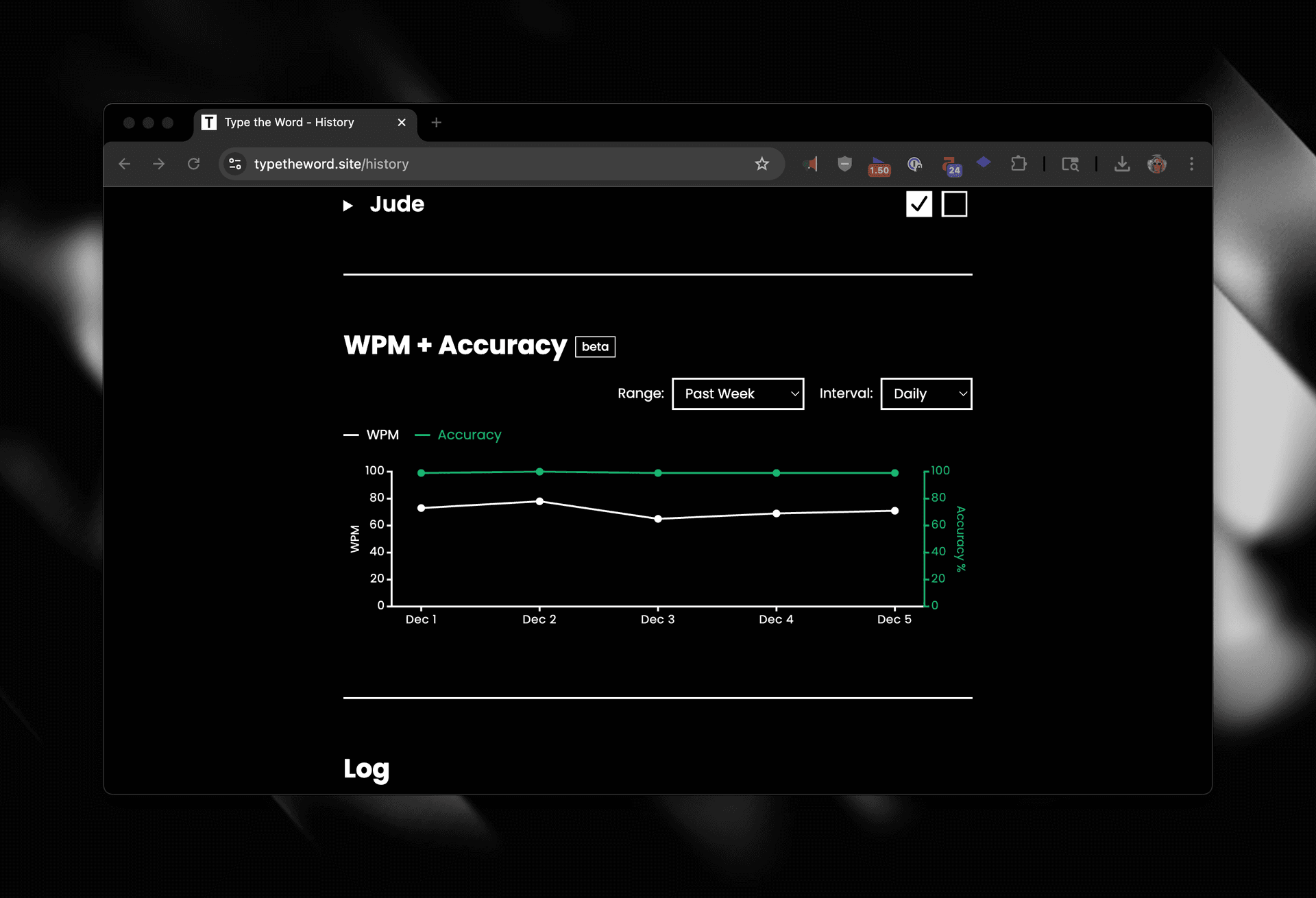
- - Added an early access feature section for opting yourself into new features. The first feature that you can opt into is the recent WPM and Accuracy UI I created for the /history page.

- - Started a beta for WPM and accuracy stats on the history page. If you're interested in joining, reach out at .
- - Added a global shortcut for focusing the passage selector: ^+P
- - I'm working on adding WPM stats to Type the Word and while I was doing a small migration I accidentally ran some SQL against the prod database. I restored to a backup point at 1:02pm, but I wanted to move quickly and I may have lost the data within the window of 1:02 pm and 1:22 pm CST. Sorry for the inconvenience everyone!
-
- When you navigate to a chapter TTW will now find and focus on the next verse to type based on your typing history.
- - I'm performing a scheduled database upgrade right now. Feel free to keep typing, but your progress will not be saved.
This migration is completed. This database instance is slighly cheaper, and should be faster than the previous one.
- - TTW will be down for maintenance from 10pm to 11pm CST on Sunday, 11/23 for a database upgrade. Feel free to keep typing, but your progress will not be saved.
Note: I attempted to do this upgrade today, but ran out of time before work. No data was lost during this attempt. - - Added email/password auth so you no longer have to sign in with Google. You can now create an account with just your email and password.
- If you want to create multiple accounts with the same email you can use email aliases. For example, if I wanted to create an additional account for
josh@typetheword.comI could sign up withjosh+2@typetheword.comand it would be treated as a different account. Note the+2is just an example and you can use any text after the+. - If you already have an account with Google and want to move to an email/password account: Create a new email/password account and email me both the old and new email addresses and I can migrate your data for you.
- If you want to create multiple accounts with the same email you can use email aliases. For example, if I wanted to create an additional account for
- - Added a new donate page and a donate link in the footer. Any help paying hosting costs is greatly appreciated.
- - Fixed a bug preventing you from completing 1 Kings 4:20 and 2 Chronicles 2:1.
- Fixed a bug with how the overview section looked for 2 Timothy. If you typed the second chapter more than once each verse past the first time through was causing the overview section to indicate you had typed the entire book again.
- Fixed a bug where only the first verse in 2 John and 3 John were available to be typed.
This is related to the issue I solved for Philemon and Obadiah on March 11th. The ESV API has been transitioning how to reference books with a single chapter. Before "Obadiah 1" pulled the chapter of Obadiah, but now it only pulls the first verse.
- Fixed a bug shipped on March 6th similar to an issue I've seen before where I was depending on the number of verses in a chapter to download the entire chapter. Since many chapters skip verses this means TTW was not downloading the last verse. Mark 11, Mark 15, and Luke 17 were the effected passages.
- Fixed a bug where only the first verse in Obadiah and Philemon were available to be typed.
- Fixed a visual bug in the "Overview" section within /history where your book progression wasn't aligned to the right on mobile or safari.
- Fixed a bug where your the "Log" section within /history was being calculated based on the server's timezone. This was misleading because sometimes your typed verses would show up in the next or previous day.
- - Fixed a bug where only the first verse in Jude was being loaded preventing you from typing the chapter.
- - Did a small batch of updates to optimize for retyping through sections of the Bible.
- The passage text being dimmed now means something different.
- Before the text was dimmed when you had previously typed it.
- Now the text is only dimmed when you have started typing this chapter and have typed this verse. When you complete the chapter the dimming is reset.
- Since chapters can now reset,
- I added a Log section to the bottom of each chapter. Unlike the Log within
/historythis Log is specific to this chapter.
- And I removed the dimming on that would automatically happen for the current verse.
- I added a Log section to the bottom of each chapter. Unlike the Log within
- I also updated the overview section within
/historyto reset once you have finished typing through a book.
Your progress through a book is now shown with a box. Similar to chapter progression, this box will fill up until you completely type the book and then it will be checked and another box will appear.
- Lastly I fixed some incorrect verse counts in 2 Timothy 3 and 4 that were allowing you to have over 100% completion.
- The passage text being dimmed now means something different.
- Increased the contrast of the built in "Light" and "Dark" themes.
- Fixed a bug where TTW was not downloading the last verse of chapters in the ESV translation where verses are omitted.
- Fixed a bug where 2 Timothy 1 was incorrectly counting the number of verses on the history page.
If you have typed these chapters and are not seeing 100% completion I would navigate to them now and check the last verse.2024
- Fixed an edge case in theming where changing your theme on one device wouldn't inject the new theme styles on other devices.
- Fixed some parsing issues that prevented typing through Psalm 145:13.
- Fixed an a bug in the color input where it wouldn't allow you to select completely desaturated colors.
- Fixed an issue where the previous verse button on Titus 1 was pointing to a non existent 2 Timothy 6.
- Fixed a bug where⌘+← was no longer restarting the verse.
- Fixed a bug where Romans 16 was mistakenly only showing the first 26 verses.
- Fixed incorrect spacing in the quote within Matthew 6:10-13. This was previously fixed and then reverted. It's fixed for good now!
- - Custom themes are live!
- You can now create your own themes for Type the Word.
- Themes are saved in the database and will be available on all devices you are logged in with.
- When creating a theme, you can minimize the settings, and preview your theme throughout Type the Word, before opening up the Theme Creator again to save it.
- The "System" theme now allows you to choose what particular light and dark themes you want to use.
- And if you match the "Secondary" color and "Success" colors you get this fun disappearing effect.
- - Fixed a regression where incorrect letters were not highlighted in red.
- Fixed a bug with backspace (←) where it would delete an entire word. This was a bug in Chrome that would happen after the shortcut for deleting the previous word was used (^+←) despite the ^ being unpressed.
- Fixed some incorrect spacing in the quote within Matthew 6:10-13
- - Fixed a long time bug that prevented access to Song of Solomon 4-6
- - Fixed a long time bug where the line indicating what verses you have completed would flicker on verse completion.
- - I updated the home page with details about how TTW works to improve SEO.
- - On Windows, the 'restart the current verse' keyboard shortcut never actually worked. Thanks for pointing this out @AidenC! You can now restart the current verse on Windows with ^+↑+← . The MacOS shortcut is still ⌘+← .
-
- Updated the "Log" section
/historyso you can more visual see how consistenly you are typing. If there is any summary information you are dying to know. Let me know!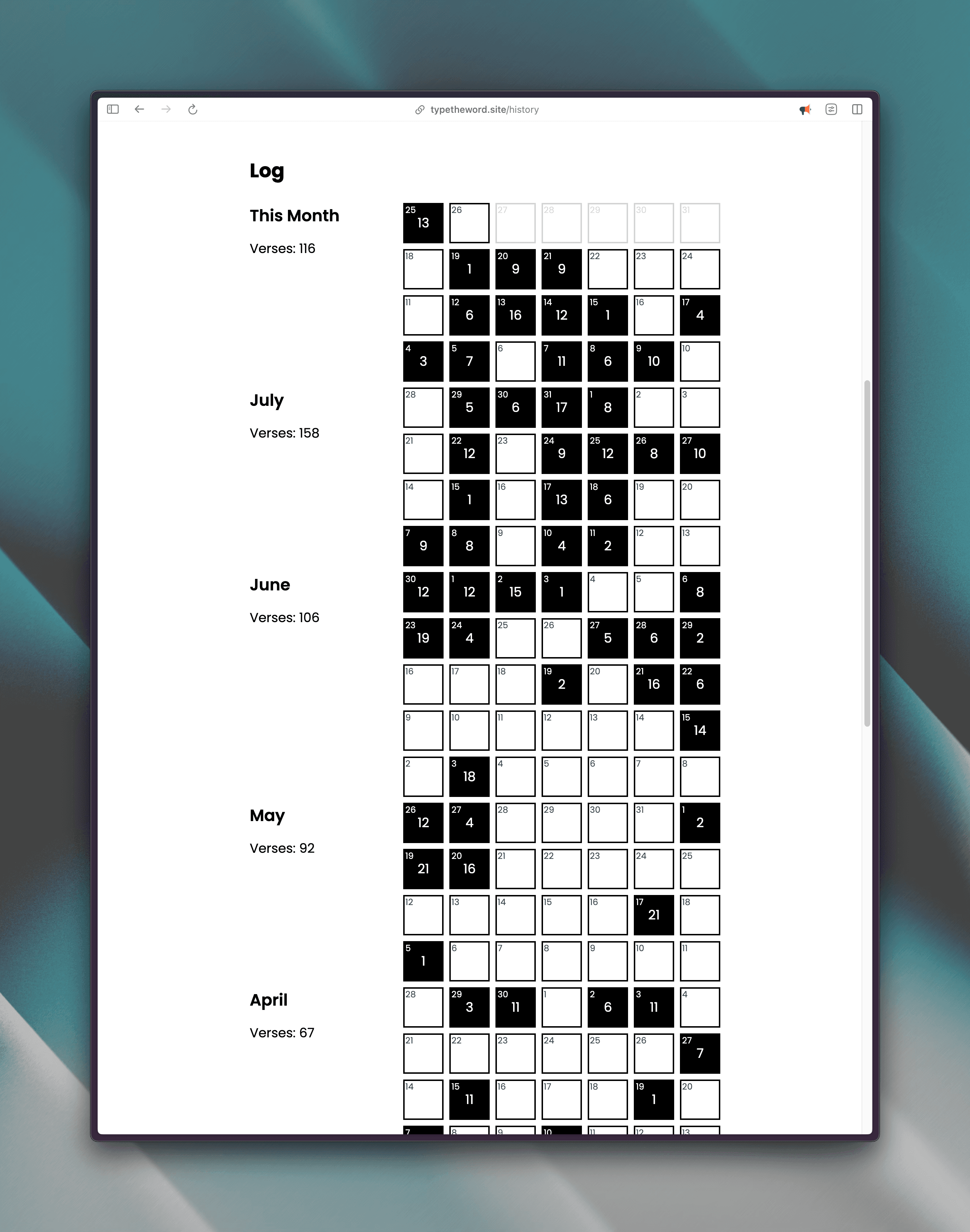
- Switched the position of the "History" and "Settings" links in the authed dropdown.
- Updated the "Log" section
- - Added global shortcuts for opening settings and going to
/history- ^+↑+Y navigates to history
- ^+↑+, opens settings
- - Created "Settings" section so you can manually change the color scheme
- - Added keyboard shortcuts for deleting the previous word and restarting the verse.
- ^+← deletes the previous word
- ^+↑+← restarts the current verse
- - Fixed bug in next chapter button when on the second from last chapter of a book. The next chapter button was linking the next book rather than the last chapter. This link now points to the last chapter.
- - Added a twinkle animation to notify users when there are new updates in the changelog.The changelog is one of the ways I communicate with you all as things change. This twinkle animation will be present therenotifying you that there are new updates to read. Visiting the

/changelogpage dismisses this notification. - - Updated Type the Word to remember where you last typed.
- When you are logged in and load the home page (
/) TTW redirects you to the last location you typed. - You can also navigate to your last typing location by clicking the TTW logo in the header.
- When you are logged in and load the home page (
- - Started managing an email list.
I've had the privilege of emailing many of you individually, but I want to make sure everyone who wants to be is kept up to date with the project. So in addition to having an email in the footer, I'm starting a newsletter that will round up changes in small batches each month. New users are able to join by confirming their email after sign up (which lands them on this snazzy new page.)
All current users were opted into the newsletter, but the first issue will have a big unsubscribe button. The last thing I want to be is another leech on your attention. - - Migrated Type the Word to App Router and REST.
This was a programming update to how Type the Word works. Originally, I built Type the Word on some new tech so that I could try TRPC and Axiom. Now that it's growing, I have migrated to more stable platforms to lower the maintenance burden. I am using REST for network communication and Sentry for debugging.- You may have noticed some short outages around this time! Sorry for the disruption. I don't think there will be this big of an architectural change again.
- Type the Word is open source. If you are ever curious to see how it works, check out the Github repo here.
- - Fix: At some point I broke the ability to access 2 Timothy 😅. 2 Timothy is now accessible!
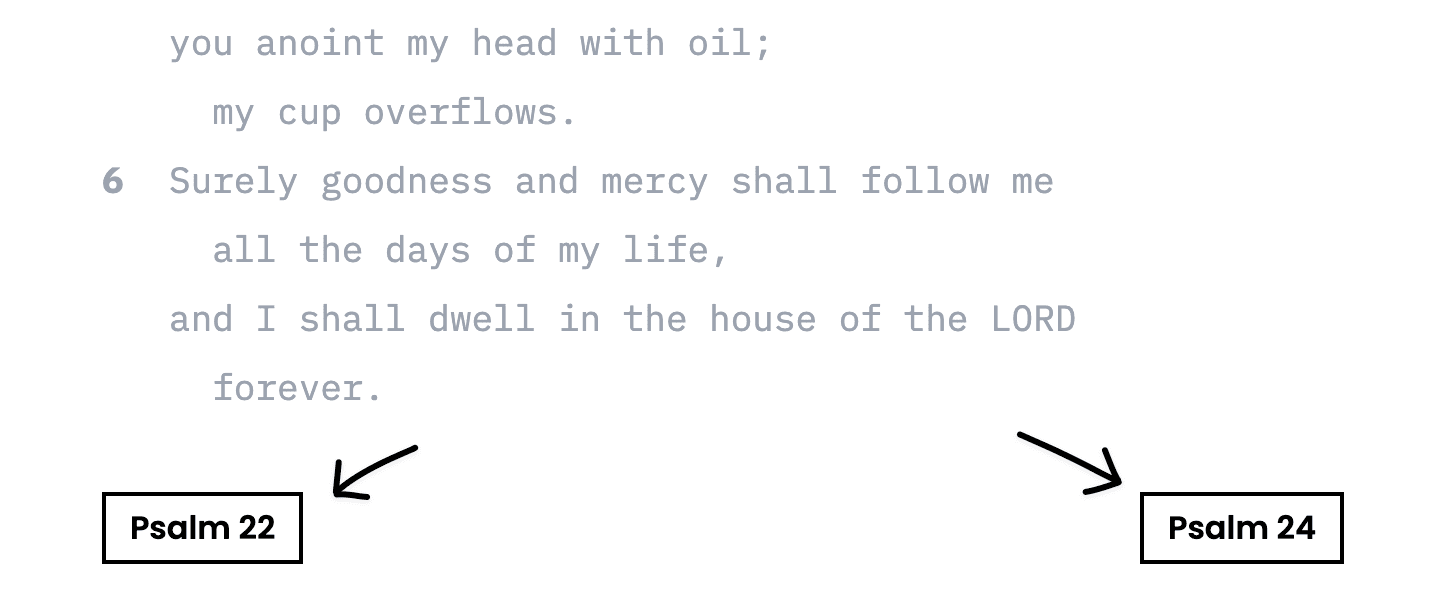
- - Add links for easily navigating to the previous and next passages.
- Remove restriction preventing you from backspacing through correct words. This update makes getting 100% accuracy still possible when you have a missed typo.
- Fix a bug where you couldn't complete a verse without logging in.
- Fix the flicker that could happen when completing a verse.
- - Add some much needed database indexes to speed up the history page.

- - Update the
/historypage with an overview section to see what passages you've typed.- Fixed weird gap in typed indicator in sections that have quotes like Hebrews 2 verse 13.
- Fixed the small animation happening between
/passagepages and other pages - Fixed flicker that would happen on completing verses
- Tweaked cursor animation logic to disable vertical cursor animation, but animate for longer words that are completed to early.
- Updated the passage selection state to work with native browser navigation.
- Created this changelog
- - Wrote a blog post about all the little details
2023
- - Added Dark Mode (Thanks to @IsaacHatton)
- - Added smooth scrolling
- - Released Type the Word
Looking for a passage to type after reading updates? Here are some suggestions: Psalm 1, Psalm 16, Isaiah 53, Lamentations 3, John 1, Romans 8, James 3, Jude.